Bei Verfügbarkeit benachrichtigen

Nachricht erhalten, sobald dieses Produkt wieder verfügbar ist.

E-Mail ist erforderlich.

E-Mail ist erforderlich.

Wir schützen deine persönlichen Daten und geben deine E-Mail nicht an Dritte weiter.

Vorbestellung
Jetzt
inkl. MwSt.exkl. MwSt.
UVP
inkl. MwSt.exkl. MwSt.
Jetzt
inkl. MwSt.exkl. MwSt.
 
Der endgültige Preis und die Mehrwertsteuer können je nach Versandziel an der Kasse variieren.
0 % Mehrwertsteuer für KMU aus AT & DE .
Vorbestellung
Jetzt
inkl. MwSt.exkl. MwSt.
UVP
inkl. MwSt.exkl. MwSt.
Jetzt
inkl. MwSt.exkl. MwSt.
 
Der endgültige Preis und die Mehrwertsteuer können je nach Versandziel an der Kasse variieren.
0 % Mehrwertsteuer für KMU aus AT & DE .
Bulk Discount
Code cannot be combined with other codes.
inkl. MwSt.exkl. MwSt.
Mehr exklusive Angebote
Versand innerhalb von 1 Werktag (Vorbestellungen ausg.) | Gratis Lieferung ab €99
shipping-icon
60-Tage Preisgarantie
Rund-um-die-Uhr Expertenservice

xTool F1/F2 Slide Extension

Vsl. Versand in 10 Werktagen
inkl. MwSt.exkl. MwSt.
Vsl. Versand in 10 Werktagen

Slide Extension for xTool F1

Fast & Easy Process in 4X Area

Smarter Processing with Larger Projects

Smarter Processing with Larger Projects

Long Enough to Do All
the Projects on Wish Lists

Long Enough to Do All
the Projects on Wish Lists

Process 500+ Materials
with xTool F1

Process 500+ Materials with xTool F1

Easy to Use from Unbox to Project Done

Directly Plug in to Use

xTool F1 Slide Extension is preassembled, and no extra installation is needed. Take it out of the box and plug
in the cable. That's all you need to prepare to engrave
or cut.

Directly Plug in to Use

xTool F1 Slide Extension is preassembled, and no extra installation is needed. Take it out of the box and plug
in the cable. That's all you need to prepare to engrave
or cut.

Perfect Alignment with Scale Rulers

Put materials on the Slide Extension, and use scale rulers to know the exact coordinates of materials placed on it. We design the absolute coordinates to make the coordinates in the xTool Creative Space software exactly the same as the scale rulers on the extension.

Easy Focus, Smart Framing

Same as using xTool F1, manual/auto focus and outline/frame preview are applicable to slide extension as well. During the preview, you can turn the knob to move left/right the extension to preview the entire working space of the extension.

Engrave & Cut in One Button

With a simple push, slide extension will automatically move to engrave and cut all your design.

Perfect Alignment with Scale Rulers

Put materials on the Slide Extension, and use scale
rulers to know the exact coordinates of materials
placed on it. We design the absolute coordinates to
make the coordinates in the xTool Creative Space software exactly the same as the scale rulers on
the extension.

Easy Focus, Smart Framing

Same as using xTool F1, manual/auto focus and outline/frame preview are applicable to slide extension
as well. During the preview, you can turn the knob to move left/right the extension to preview the entire working space of the extension.

Engrave & Cut in One Button

With a simple push, slide extension will automatically move to engrave and cut all your design.

Done!

Detailed Designs that Elevate the Finish

New Cutting Panel Design

The cutting panel provides enough space under the materials for airflow during cutting, and will bring a cleaner and smoother cutting finish.

Two Metrics on the Ruler

The Slide Extension provides both mm and inch metrics to avoid extra calculations.
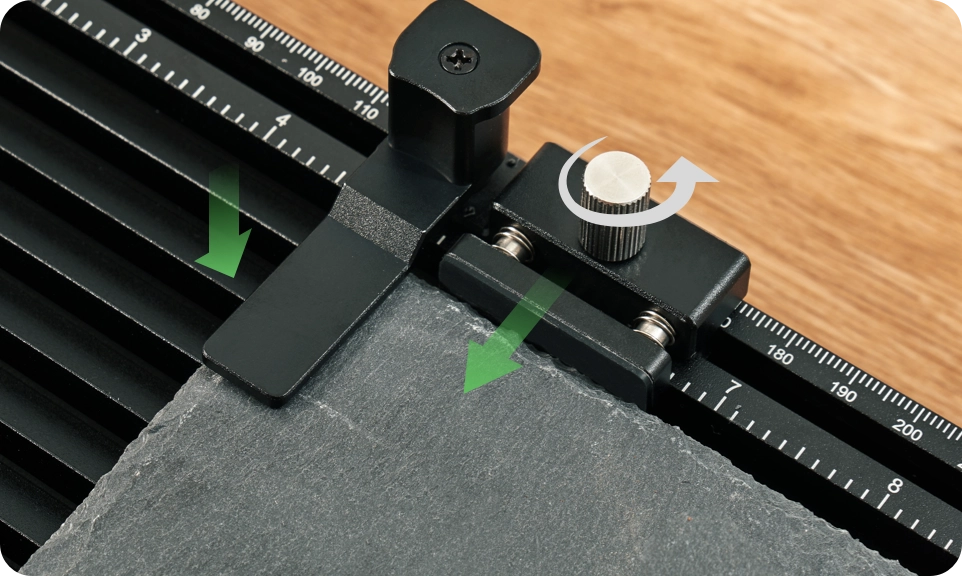
2 Clamps for Edges

Use 2 clamps in both up and down edge slots to fixate thinner materials firmly.

3 Clamps for All Shapes

Use 3 other clamps in various ways to hold thicker projects in place.

Easy to Use from Unbox to Project Done

Easy to Use from Unbox to Project Done

List of Items
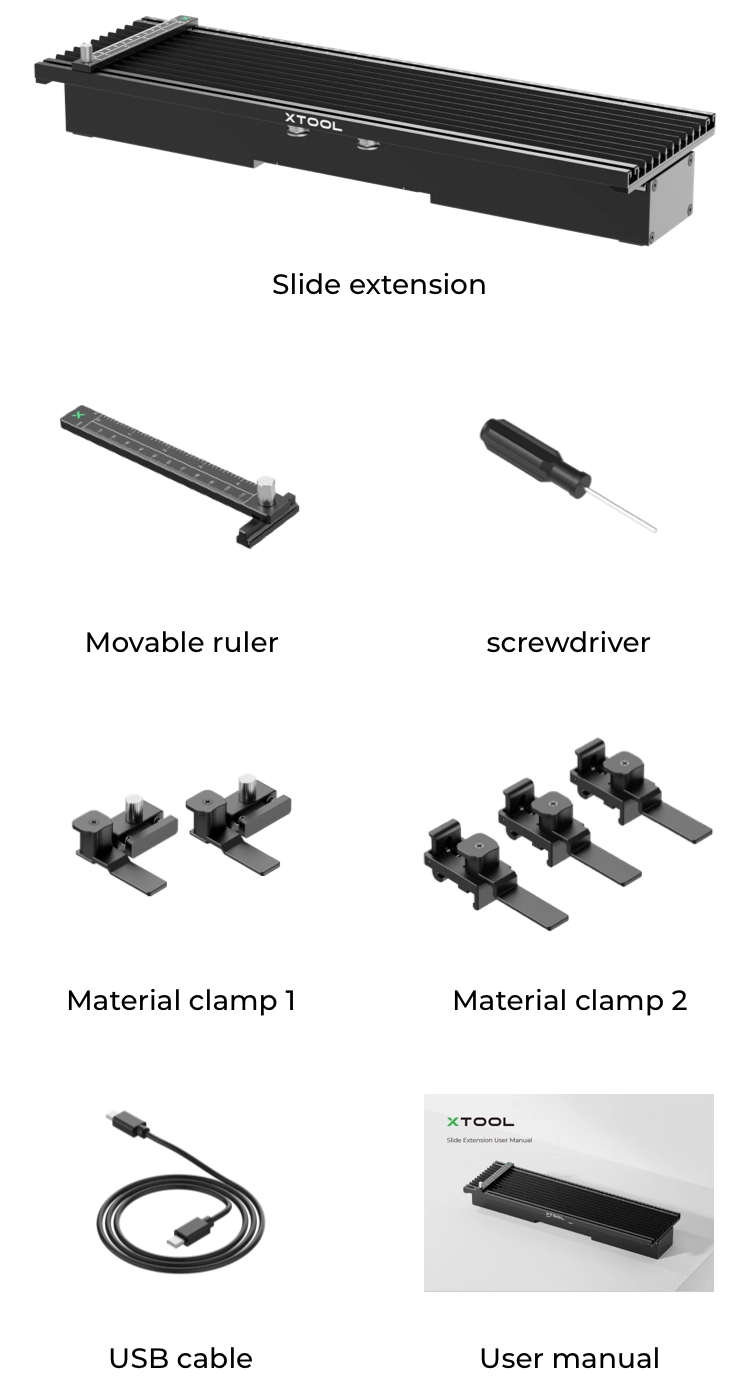
List of items

Customer Reviews

Based on 9 reviews
89%
(8)
11%
(1)
0%
(0)
0%
(0)
0%
(0)
F
Frank Tischer
Perfekte Erweiterung für den F1

Leicht zu installieren, perfekt in der Software integriert.
Die Anschaffung hat sich gelohnt.

D
Der Nachbar
Der Hammer!

Es hat mich wirklich überrascht aber das ist ein absolutes Pflicht Zubehör! Es funktioniert auf anhieb einfach so unendlich gut und intuitiv, man steckt es ein und sofort ist die Laserbare fläche riesig und dank der perfekten Integration in Xtool Studio funktioniert es ohne großartig nachzudenken.

P
Peter Heinze
Slide Extension

Ich konnte die slide Externsion nun ein paar Tage testen und bin hoch zufrieden. Verarbeitung und Präzision im gewohnten Maße Top. Mein X Tool F1 habe ich in eine anderes Level gehoben und kann nun auch Arbeiten machen die vorher deutlich mühseliger waren oder gar nicht erst gingen. Trotzdem ist die Flexibilität erhalten geblieben, was mir sehr wichtig war.

B
Bernd Zwing
sehr sinnvolles Zubehör - Top Verarbeitet !

alleine durch die Größe des F1/F2 macht dieser Slide Extension sinn. Er ist sehr gut verarbeitet und funktioniert tadellos! Einziges Manko, die Abdeckung ist dann dauerhaft "offen" und das tragen einer Laserschutzbrille sollte dann klar sein. Ich habe mit dem 3D-Drucker seitliche "Sichtberblendungen" hergestellt, somit ist der seitliche Blendschutz gegeben. Vielleicht sollte hier XTOOL noch etwas beilegen... Alles in allem ein sehr zu empfehlendes Zubehör.

N
N.I.
Kleiner feiner Helfer

Alles prima , arbeitet einwandfrei und gut nun sind die Möglichkeiten viel grösser . Gut verarbeitet und kam auch super schnell und gut verpackt .